서버에서 nginx 설치 폴더와 사이트의 웹루트 폴더를 다음과 같다고 가정한다.
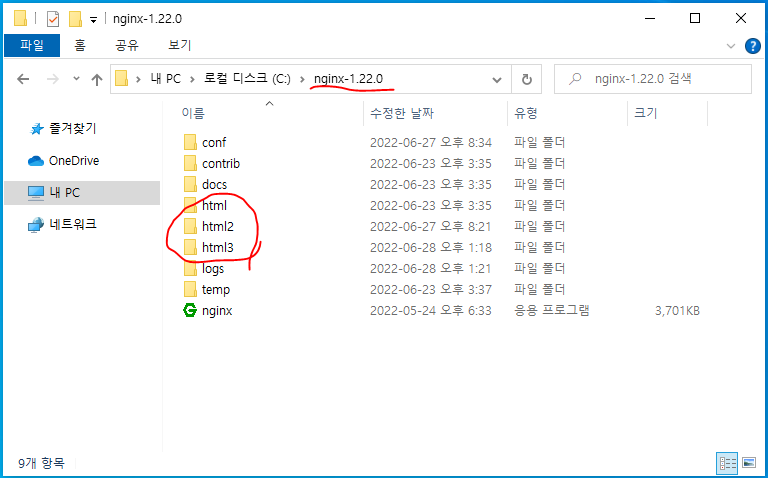

-. C:\nginx-1.22.0\conf\nginx.conf 파일
worker_processes 1;
events {
worker_connections 1024;
}
http {
include mime.types;
default_type application/octet-stream;
include "C:/nginx-1.22.0/conf/sites-enabled/*.conf";
}
-. C:\nginx-1.22.0\conf\sites-enabled\example.com.conf 파일 *example.com 사이트
server {
listen 80;
server_name example.com;
location / {
root html;
index index.html index.htm;
}
error_page 500 502 503 504 /50x.html;
location = /50x.html {
root html;
}
}
-. C:\nginx-1.22.0\conf\sites-enabled\example2.com.conf 파일 *example2.com 사이트
server {
listen 80;
server_name example2.com;
location / {
root html2;
index index.html index.htm;
}
error_page 500 502 503 504 /50x.html;
location = /50x.html {
root html2;
}
}
-. C:\nginx-1.22.0\conf\sites-enabled\example3.com.conf 파일 *example3.com 사이트
server {
listen 80;
server_name example3.com;
location / {
root html3;
index index.html index.htm;
}
error_page 500 502 503 504 /50x.html;
location = /50x.html {
root html3;
}
}
'관리' 카테고리의 다른 글
| X11 포워딩 - Ubuntu DeskTop 22.04 (0) | 2026.10.01 |
|---|---|
| Ubuntu 20.04 네트워크 설정 - 고정 IP (0) | 2026.09.25 |
| dd 백업, 복구 - gz 압축 (0) | 2026.09.25 |
| 노후 디스크교체/업그레이드 - RHEL4 (0) | 2026.09.25 |
| MaaS - ESXi 연동, 전원구성 (0) | 2026.09.25 |